How to Export Yahoo Mail Emails to HTML Easily in 2026
Sophia’s Query: I need to convert my Yahoo Mail emails into HTML format for offline access and browser viewing. What is the easiest way to export Yahoo emails as HTML files while keeping attachments and email layout intact?
Summary: Yahoo Mail stores many important emails, which include personal records, invoices, and business conversations. Most of the users export Yahoo emails to HTML for offline reading and easy browser access. Whereas HTML files also help preserve email formatting and attachment details properly. In this guide, you will learn simple methods to export Yahoo Mail emails to HTML format. The article covers both the manual method and the professional EmailBackupHelp Yahoo Backup Tool to save Yahoo emails safely in 2026.
Comprehensive Reasons to Export Yahoo Mail to HTML
- HTML files can open easily in any web browser without any email application.
- Users can keep a readable backup of important Yahoo Mail emails on their computer.
- It helps free up space in the Yahoo Mail account after downloading old emails.
- Users can access saved emails even when the internet connection is unavailable.
- HTML files are useful to store invoices and business conversations safely.
- You can save HTML emails, which can work as long-term records for general use.
Conventional Approach to Export Yahoo Mail Emails to HTML
This manual method uses the Save Page As option to save your Yahoo emails as HTML. It is a reliable manual solution that only requires a web browser to open Yahoo email and save it as HTML. Follow the steps to accomplish the process.
- To initiate, open your web browser and sign in to your Yahoo Mail account.
- Now, open the email that you want to save in HTML format,>> click on the More option.
- Select the Print option to open the Save As Window >> choose a location to save the file.
- In the “save as type” section, select webpage, complete, or HTML.
- Thereafter, click on the Save button to download the Yahoo email as an HTML file.
- Now you can open the saved HTML file in any web browser for offline access.
Limitations of the Manual Method
- Attachments are not always saved along with the HTML email file.
- Large email formatting may change after saving the webpage.
- Embedded images sometimes do not load properly in the saved HTML file.
- This method does not support bulk export of Yahoo emails to HTML.
- Folder hierarchy and email organization are not maintained properly.
Advanced Solution to Export Yahoo Mail Emails to HTML
To maintain the file formatting and keep the email saved along with the emails, use dedicated software. The Yahoo Backup Tool is a simplified software that is created to export Yahoo Mail data in different formats. It makes sure to keep the users’ data safe and maintain their folder hierarchy. You can also save Yahoo emails as a PDF, PST, CSV, and other formats.
Simple Steps to Download Yahoo Mail Emails to HTML
- In your system, download and launch the software and run it.
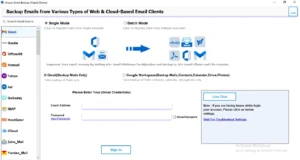
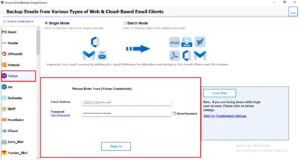
- Choose Yahoo Mail from the left-side source panel and enter the credentials.
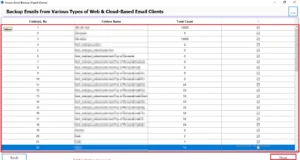
- All folders will be fetched, and you can select the required folders and click Next.
- Select HTML from the “Save in file format” drop-down list.
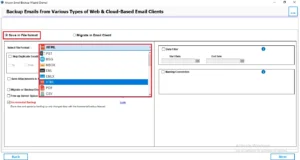
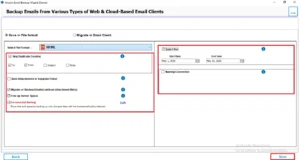
- You can apply the additional filters if you want selective data exportation >> Next.
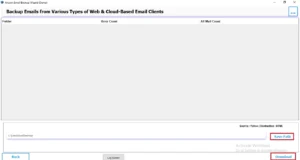
- Choose the destination path to save the resultant files and click on Download.
Additional Features Provided by Yahoo Backup Tool
|
Use Case Study
A small business owner was using Yahoo Mail to manage customer orders and payment records. Later, they wanted to export Yahoo Mail emails to HTML format for offline access and future reference. At first, they tried to save emails manually from the browser, but it took a lot of time for thousands of emails.
Afterward, they used a Yahoo Backup Tool to save Yahoo email as HTML. This software helps them to save all emails with attachments and maintain the original format of the email.
Comparison Table
| Features | Conventional Method | Advanced Software |
| Bulk Email Export | No | Yes |
| Risk of Email Loss | Possible | Very Minimal |
| Suitable for Large Data | No | Yes |
| Selective Email Export | No | Yes |
Conclusion
This article has discussed different ways to export Yahoo email to HTML with the help of both manual and professional methods. You can use the manual methods if you have a small number of emails in your Yahoo account. However, if you have a large amount of data, it is better to use an automated solution. Now that you know all the options, you can choose the one that works best for you.
Frequently Asked Questions
Ans. Yes, exported Yahoo Mail HTML files can be opened in any web browser like Chrome, Edge, or Firefox. The email content, formatting, images, and links are usually displayed in a readable webpage format.
Ans. The export time depends on the number and size of Yahoo emails. Exporting a few emails may take only minutes, while large mailboxes with attachments can require more processing time.
Ans. To create a legal backup, open the Yahoo email, use the Save Page As option, and choose HTML format. This keeps the email content readable and helps maintain a proper offline record.
Ans. Yes, most exported Yahoo Mail HTML files preserve clickable hyperlinks. When you open the HTML file in a browser, the links generally work the same way as they do in the original email.
About The Author

Khushboo Maurya is a content and website optimization expert who helps blogs and websites grow naturally. She focuses on improving content quality and reaching more people through smart, simple strategies.