How to Migrate Yahoo Mail to HostGator Without Data Loss
User Query: Has anyone successfully set up Yahoo Mail to fetch emails from a HostGator POP3 account? I’ve tried all day, even with HostGator support, but Yahoo still won’t fetch the mail. If you got it working, please share the Yahoo Mail POP3 settings you used.
Nowadays, most of the users prefer to move from Yahoo Mail to HostGator email for better communication and advanced HostGator features. However, the issues like failed POP3 connections and mailbox syncing errors make the process difficult. If you are also struggling to connect your Yahoo Mail with a HostGator account to fetch emails successfully, it is important to follow the correct migration approach. In this article, we will help you to migrate Yahoo Mail to HostGator with the manual method and the reliable EmailBackupHelp Yahoo Backup Tool without data loss and in a hassle-free way.
Why Users Migrate from Yahoo Mail to HostGator?
- HostGator offers a better email management with easy account configuration.
- It offers a flexible storage capacity and better server management for large email.
- Moreover, users get additional benefits such as spam protection and email account support.
- Users can create a domain-based email address that improves professional communication.
Pre-Requisites Before You Migrate Yahoo Mail to HostGator
- Take a backup of your important Yahoo Mail data.
- Make sure to enable IMAP in Yahoo Mail.
- You must have or create a HostGator email account.
- Before you start the migration, you need to verify the mailbox storage space.
- Most importantly, keep your login credentials ready.
- For smooth migration, make sure you have a stable internet connection.
Manual Method to Transfer Yahoo Mail to HostGator
Before you begin the migration process, make sure to configure your Yahoo Mail with HostGator with the help of POP3/IMAP.
Yahoo Mail IMAP Settings
| Setting Type | Details |
| Incoming Server | imap.mail.yahoo.com |
| Port | 993 |
| Encryption | SSL/TLS |
Yahoo Mail SMTP Settings
| Setting Type | Details |
| Outgoing Server | smtp.mail.yahoo.com |
| Port | 465 or 587 |
| Encryption | SSL/TLS |
HostGator POP3 Settings
| Setting Type | Details |
| Incoming Server | mail.yourdomain.com |
| Port | 995 |
| Encryption | SSL |
Step 01: Create a HostGator Account
- Sign in to your HostGator cPanel account through valid administrator credentials.
- Go to the email account section and create a new email address on your HostGator domain.
- Now, access your Yahoo Mail settings >> make sure the IMAP option is enabled.
- Create a Yahoo Mail app password to allow secure access.
Step 02: Add your Yahoo Mail
- Install an email client such as Outlook or Thunderbird on your system.
- Then, add your Yahoo Mail account with the correct IMAP server settings.
- Configure the HostGator mailbox with its proper server details.
- You need to provide accurate login credentials for both Yahoo and HostGator accounts.
- Begin the email synchronization, and it allows sufficient time to migrate successfully.
- Thereafter, review the Hostgator and confirm that the migrated data appears correctly.
Drawbacks of the Manual Method
- It is a time-consuming method for large mailboxes.
- There might be a risk of missing emails.
- You may see a folder hierarchy issue when migrate Yahoo Mail to HostGator.
- You can see the frequent authentication failures.
- There is no selective migration option available.
Reliable Utility to Migrate Yahoo Mail to HostGator
Yahoo Backup Tool is a simplified solution that migrates your data to HostGator in a smooth way. This software is made to minimize human effort and time. With the help of its embedded features like skip duplicate emails, free up server space, and date range filter, users can perform selective migration. It also allows users to migrate Yahoo Mail to Yandex Mail and other email clients. In addition, if you want to export Yahoo emails to any other file formats, you can do it with this same software.
Simplified process to Move Emails from Yahoo to HostGator
- Download the Yahoo Backup Tool on your system and run it.
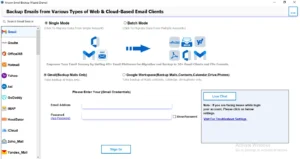
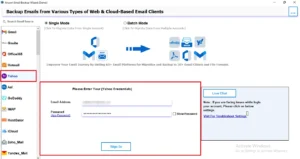
- Select Yahoo Mail and enter the valid email address and password to log in.
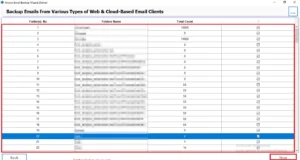
- All the mailbox data is fetched, and you choose the folder you want to migrate >> Next.
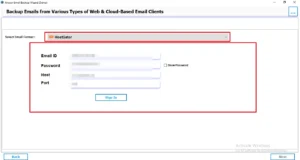
- From the given email clients, select HostGator as the output and enter the credentials.
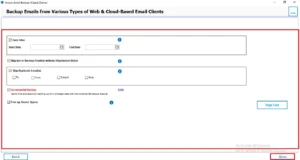
- You can enable the filter option for selective data migration from Yahoo to HostGator.
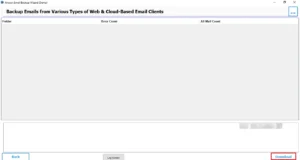
- In the end, click on the Download button to begin the process.
Advanced Key Features of the Yahoo Backup Tool
|
Conclusion
Migrating Yahoo Mail to HostGator is essential for users to get better email management and communication. We discussed the best methods to accomplish the migration process. You can either do it manually, but it has several limitations, such as being time-consuming and requiring configuration. Therefore, it is recommended to use professional software to migrate Yahoo Mail to HostGator in a simple and error-free way.
Frequently Asked Questions
Ans. Verify the IMAP/POP settings and use the correct Yahoo app password. Also, check SSL/TLS ports and ensure the HostGator mailbox has enough storage space.
Ans. Users may face authentication errors, missing emails, duplicate messages, or attachment transfer issues. Incorrect server settings and slow internet can also interrupt migration.
Ans. Yes, HostGator supports Yahoo Mail IMAP configuration with the correct server settings. It allows secure email synchronization and mailbox transfer.
Ans. The migration time depends on mailbox size, internet speed, and email volume. Smaller accounts transfer faster, while larger mailboxes may take hours.
Ans. Outlook, Thunderbird, Apple Mail, Windows Mail, and eM Client support Yahoo to HostGator migration. These clients allow email transfer using IMAP or POP3 settings.
About The Author

Khushboo Maurya is a content and website optimization expert who helps blogs and websites grow naturally. She focuses on improving content quality and reaching more people through smart, simple strategies.