How to Migrate Yahoo Mail to Yandex Mail Without Errors
Email migration helps users move their data from one platform to another platform. Most of the professionals choose Yandex Mail for its strong security and generous storage features. Yahoo Mail users find Yandex Mail a reliable and feature-rich alternative for daily communication. Also, a proper migration process makes sure all emails and contacts are transferred completely and accurately. This guide walks you through a reliable solution that includes an enterprise-level Yahoo Backup Tool in a hassle-free way.
Common Reasons to Import Yahoo Emails to Yandex
- Yandex Mail offers more storage space as compare to Yahoo Mail.
- Some users face frequent login issues with Yahoo Mail.
- Yandex Mail has a cleaner and easier interface to use.
- Most of the users want better spam filtering for their inboxes.
- Yandex Mail keeps emails more organized and easy to find.
- Some businesses prefer Yandex Mail for professional communication.
|
Quick Steps to move emails from Yahoo to Yandex
|
Native Method to Migrate Yahoo Mail to Yandex Mail
Step 01: Generate a Yahoo App Password
Because of Yahoo’s security policies, you cannot use your primary Yahoo password to log into third-party tools. You have to create a unique App Password.
- Log in to your account on the Yahoo Account Security page.
- Drag down and click on Generate app password.
- Then, select Other App from the dropdown menu, type “Yandex“, >> click Generate.
- Copy the generated 16-character password (you will need this in Step 2).
Step 02: Configure the Yandex Mail Importer
- Once you have your app password, link the accounts directly inside Yandex.
- You need to log in to the account on the Yandex Mail Web Portal.
- Click on the Gear icon (All settings) in the top right corner.
- Select Mail Importer (or “Import mail from other mailboxes”).
- Enter your Yahoo Mail email address.
- Paste the Yahoo 16-character App Password you generated in Step 1 into the password field.
- Click Log in or Grant Yahoo Mail POP3 Access.
Step 03: Map Your Emails
- Make sure the importer is set to IMAP so it copies your exact folder layout.
- Click Start Import.
Limitations of the Manual Method
- Large mailboxes may take a long time to import your emails to Yandex.
- The internet interruption can stop the synchronization process.
- Some emails with large attachments may fail to migrate properly.
- There are no advanced filter options available for selective email migration.
Professional Method to Yahoo Mail to Yandex Mail migration tool
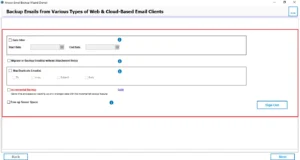
The Yahoo Backup Tool is made to facilitate the smooth migration of Yahoo Mail to Yandex. It is equipped with advanced filter options, which include a Date Filter and various other customizations. Also, the tool enables users to selectively export only the emails that meet specific requirements. It preserves the original email structure along with complete attachments. You can transfer emails from Yahoo Mail to Hotmail, Gmail, and other formats. This software also export Yahoo Mail to MBOX, PST, PDF, and other formats.
Easy Steps to Migrate Yahoo Mail to Yandex Mail
- To initiate the migration, launch the Yahoo Backup Tool on your device.
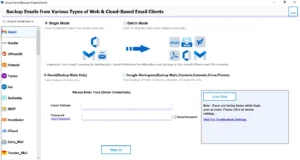
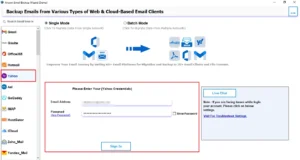
- Select Yahoo Mail and enter the login credentials for the same.
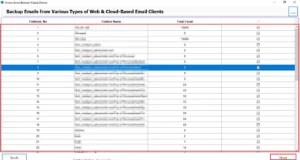
- In the tree structure, it displays all the folders, select and click on the Next Button.
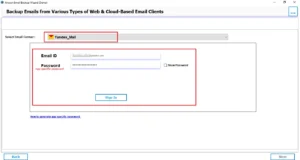
- You need to select Yandex Mail from the given email client dropdown.
- After authentication, a filter panel opens, then enable the filters >> press Next.
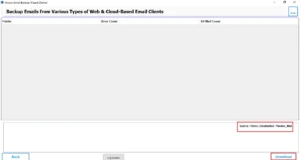
- See the migration details, and click on Download to start the process.
Real-Life Scenario – A Graphic Designer
Sarah, a Mumbai-based designer, recently switched from Yahoo Mail to Yandex due to login issues and storage problems. She used the Yahoo Backup Software to export her emails and applied the date filter to move only two years of emails. All her client emails and attachments were transferred successfully with no data loss.
Conclusion
To wrap it up, we covered all the aspects because of which users to migrate Yahoo Mail to Yandex Mail. You can use the manual method or professional software based on your needs. The manual method is good for small file migration. If you want a bulk migration, then use professional software for a hassle-free migration.
Frequently Asked Questions
Ans. The migration time depends on mailbox size, internet speed, and the number of emails. Small mailboxes may take a few minutes, while large accounts can take several hours.
Ans. This usually happens due to incorrect IMAP settings, poor internet connection, outdated app settings, or Yahoo security restrictions blocking the connection.
Ans. Common problems include login errors, incomplete email transfer, slow syncing, duplicate emails, folder mismatch, and attachment migration failures.
Ans. Verify IMAP settings, recheck login credentials, enable app passwords if required, ensure stable internet, and retry the migration using a reliable migration tool.
About The Author

Khushboo Maurya is a content and website optimization expert who helps blogs and websites grow naturally. She focuses on improving content quality and reaching more people through smart, simple strategies.