How to Export Yahoo Mail to CSV File Format Easily
User Query: “I need to back up my entire Yahoo Mail history into an Excel spreadsheet for a data audit. Is there a reliable way to export all my email messages directly to a CSV file?”
Summary: Need to export Yahoo Mail to CSV format? Most of the users want to save email information for reporting or data management purposes. However, Yahoo Mail does not provide a direct option to export email messages as CSV files. In this guide, we will explain the manual approaches and the professional EmailBackupHelp Yahoo Backup Tool to export data in bulk.
What is a CSV File?
In simple words, CSV is a file format that is used to store data in rows and columns. It can save your email details, such as sender, subject, etc in an organized way. Moreover, the CSV file can be opened in Excel and Google Sheets easily on any device.
Benefits of using CSV for Yahoo Mail Data
- The CSV format keeps the email details organized in one file.
- You can find the specific emails faster when needed.
- Moreover, it can easily sort records by sender, date, or subject.
- With the help of the CSV format, you can review email data in a simple spreadsheet.
Reasons to Export Yahoo Mail to CSV
- CSV keeps a copy of your important emails for future use.
- Find old email details without searching your mailbox again.
- Make simple reports from email records.
- It keeps email information stored outside your Yahoo account.
- Moreover, you can move your email details into a CRM if needed.
- It helps to manage large amounts of email information in one place.
- CSV format shares email data with team members when required.
Manual Method to Export Emails from Yahoo Mail to CSV
Use Thunderbird to export your Yahoo emails into CSV format. This process required the installation of the ImportExportTools NG add-on.
- You have to add your Yahoo Mail account to Thunderbird via IMAP.
- Then, allow Thunderbird to download and sync your Yahoo emails.
- You need to install the ImportExportTools NG add-on.
- Thereafter, select the desired folder (Inbox, Sent, etc.).
- Just right-click the folder >> choose the export option.
- Export messages or message indexes in CSV format.
- The add-on supports CSV exports and CSV indexes for email data.
Downside of the Manual Method
- This can be a slow process for multiple files.
- With this method, attachments are not stored in the CSV.
- Thunderbird does not have a built-in “export Yahoo Mail to CSV” option.
Can Yahoo Mail Export email directly to CSV?
Yahoo Mail does not provide a built-in option to directly download Yahoo emails to Excel CSV. Users who need to exhort ther emails must use the manual method or professional software. However, the manual methods are limited and time-consuming, especially for large mailboxes, which makes the automated solution a more practical choice.
Professional Method to Export Yahoo Mail to CSV
Yahoo Backup Tool is a simplified solution that is designed to preserve the folder structure. It helps to maintain the email formatting and keeps the data integrity intact. Its intuitive, simple interface helps users to easily run the software. This utility helps users to export their email in bulk. You can export Yahoo Mail emails to HTML, PST, and other formats.
Working Process to Export Yahoo Emails to CSV
- Launch and run the Yahoo Backup Tool on your device.
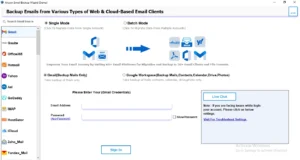
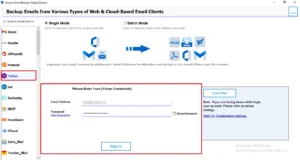
- Choose Yahoo Mail from the left panel and enter the valid login credentials.
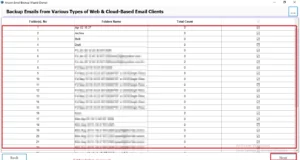
- All folders will be fetched, and select the folders you want to move and click Next.
- Now, from the save in file format, choose CSV as the saving option.
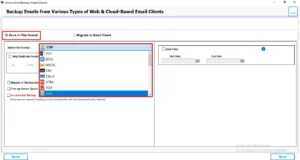
- For specific export, enable the required filters and click on Next.
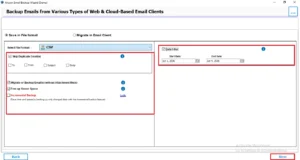
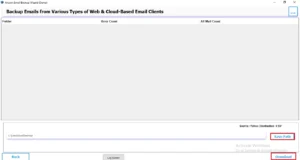
- Choose a path & click on the Download button to start the export process.
Key Features of this software
|
Common Errors Occur When You Save Yahoo Mail Emails as CSV file
- There is a possibility of missing emails from the mailbox.
- When you log in to your Yahoo Mail, there might be an authentication error.
- Large mailbox files create an issue at the time of export.
- There might be a corrupted CSV file in the output.
Conclusion
Export Yahoo Mail to CSV can be useful when users need to organize email data and manage records. However, Yahoo Mail offers limited features that do not provide a direct option to export emails. While the manual method works for small requirements, they are often time-consuming. For bulk export, a professional solution is provided that helps you to export data in a more efficient way.
Frequently Asked Questions
Ans. Yahoo Mail allows users to export contacts as CSV files. However, it does not offer a built-in feature to export email messages directly to CSV format.
Ans. Yes. CSV files are fully compatible with Microsoft Excel, Google Sheets, and other spreadsheet applications. You can open exported Yahoo Mail data directly in these programs.
Ans. A CSV file may contain email details such as sender name, sender address, recipient information, subject line, date, and other metadata, depending on the export method used.
Ans. This usually occurs because of an encoding mismatch. Open the CSV file using UTF-8 encoding in Excel or another spreadsheet application to display characters correctly.
About The Author

Khushboo Maurya is a content and website optimization expert who helps blogs and websites grow naturally. She focuses on improving content quality and reaching more people through smart, simple strategies.