How to Export Yahoo Emails to EML (Step-by-Step Guide)
If you’ve been using Yahoo Mail for years, there may come a point when you need to store or move your emails in a more flexible format like EML. This format works with a wide range of email clients that include Microsoft Outlook, Mozilla Thunderbird, and others. Hence, this is a practical choice for transferring data. The entire procedure to export Yahoo emails to EML can be useful when you’re planning to switch platforms and want to keep your data intact. In this guide, we’ll walk through some dependable ways to handle the process. We will also look at how a Yahoo Backup Tool can make the task easier and more accurate.
TL;DR: Enterprises transfer emails from Yahoo to EML format to keep a backup and move data to other platforms without hassle. This can be done either through a manual method by an email client or by using a Yahoo Backup Tool for a more convenient experience.
Why do enterprises export Yahoo Mail to EML?
Most of the users want more control over their emails, and saving them as EML files is one of the simplest ways to do that. There are some other common reasons why users perform conversion:
- Users want to keep a backup of important emails.
- It’s easier to open EML files in different email apps.
- EML format helps users to save their emails on a computer for offline use.
- Moreover, you can keep emails safe before closing a Yahoo account.
- EML helps to make sharing individual emails simple & easy when needed.
- Likewise, you can securely organize emails outside of Yahoo Mail.
Top Methods to Export Yahoo Emails to EML
When you search to export your Yahoo emails into EML format, most of the users prefer a method that is simple to follow & doesn’t take too much time. Some of those easily followed approaches are the following:
- Automated Solution
- Manual Approach
Method 01: Automated Solution to Save Yahoo Emails as EML
The Yahoo Backup Tool provides an easy way to export your Yahoo mailbox into EML format without complications or risk to your data. It supports exporting both individual emails and bulk data in a single process. You can choose entire folders or only the ones you actually need. Apart from EML, this software lets you save emails in other formats like PST, MBOX, PDF, MSG, and HTML. Moreover, there is also an option to remove data from the server once the process is complete, which helps to manage your storage.
Steps to Export Yahoo Emails to EML
- First, you have to download and open the Yahoo Backup Tool.
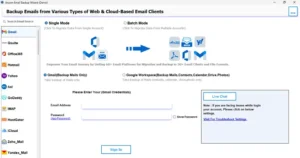
- Next, you need to sign in using your Yahoo Mail account details.
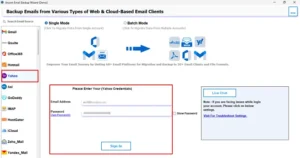
- Then, choose the emails to export & preview them before moving ahead.
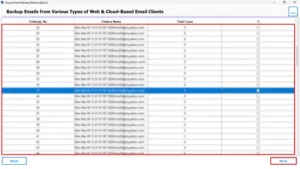
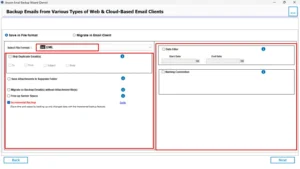
- After that, select EML from the dropdown >> apply given filters for export.
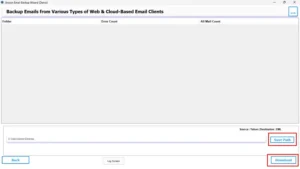
- Finally, choose a location for saved files >> Download option to complete the process.
Note: If you want another conversion, such as export Yahoo Mail to MSG, you can easily refer to our guide for a secure process.
Method 02: Manual Approach to Convert Yahoo Emails to EML
To use this approach, you’ll need your Yahoo Mail login details & an email client such as Thunderbird to be set up in advance. Since Yahoo Mail doesn’t provide a direct export feature.
Steps to Download Yahoo emails to EML
- To begin, you need to install Mozilla Thunderbird on your system.
- Next, you have to configure your Yahoo Mail account via your email address and an app password.
- Thereafter, you have to give it some time to sync & load all your emails into the application.
- Then, you need to open the folder and choose the emails you want to save.
- After that, you have to right-click on the selected messages and click on the save option.
- Finally, pick EML as the format and select a folder on your system to store the files.
Drawbacks of the Manual Method
- It can be time-consuming as each step needs to be done manually.
- The initial setup of an email client can be difficult for some of the users.
- Moreover, the original folder arrangement might not be preserved properly.
- A small error during configuration can cause issues in the whole process.
A Quick Comparison of Manual and Automated Techniques
| Factor | Manual Approach | Automated Solution |
| User Effort | This method involves several steps and setup | It is easy to use with minimal effort |
| Speed | It is slower due to the step-by-step process | The process of conversion is faster and more efficient |
| Handling Large Data | It is not ideal for large volumes | This is suitable for bulk email export |
| Skill Requirement | You might need some technical understanding | This can be used without technical knowledge |
| Data Protection | There is a chance of errors during the process | In this process, your data remains safe and intact |
| Setup Requirement | It requires an email client configuration | There is no additional setup needed |
| Suitable Use | This is better for smaller data sets | It works well for large-scale migration |
End Note
To wrap up, we looked at a few practical ways to export Yahoo emails to EML format. The manual method with an email client can work for smaller data, but it involves more steps and takes longer. On the other hand, the suggested tool makes the task much simpler, especially when handling a large number of emails. Both methods are available, so you can pick the one that suits your situation. If you face any problems, you can always contact the support team for help.
Frequently Asked Questions
Ans: Yes, you can use the Yahoo Backup Tool to export emails directly to EML without setting up Thunderbird or any other email client.
Ans: Yes, EML files are widely supported and can be opened in various email clients like Outlook, Thunderbird, Windows Mail, and others.
Ans: The time depends on the size of your mailbox. Manual methods usually take longer, while the above Yahoo Backup tool can complete the process much faster.
Ans: Not really. The manual method may require some basic setup knowledge, but using a professional tool is simple and does not require technical expertise.
Ans: Manual methods may have limitations depending on the email client, but a professional tool can handle large mailbox data without major restrictions.
About The Author

Khushboo Maurya is a content and website optimization expert who helps blogs and websites grow naturally. She focuses on improving content quality and reaching more people through smart, simple strategies.