How to Export Yahoo Mail to MSG Files Easily on Windows in 2026
Yahoo Mail has been around for years and still has a huge number of active users today. At some point, most people want a local copy of their emails saved safely on their computer. MSG files are great for this because they open directly in Microsoft Outlook without any extra setup. Moving to a new email client or just cleaning things up makes saving emails as MSG worth doing. Yahoo Mail gives you no direct way to export emails in MSG format. In this guide, we will explain the manual method and the professional Yahoo Backup Tool to export emails in a hassle-free way.
TL;DR: Organizations export Yahoo Mail to MSG because Yahoo doesn’t natively support the MSG format. To perform the export, use the email client Outlook and professional software.
Why Save Yahoo Email as MSG?
Here are some reasons why users prefer to export their Yahoo Mail data to MSG format. Basically, MSG is a file format used by Microsoft Outlook to store individual emails. Many users prefer MSG because it keeps the email structure, attachments, and metadata intact.
- MSG files provide easy access to emails in Outlook.
- It helps to maintain the original email formatting.
- Moreover, it is useful for backup and legal purposes.
- In addition, MSG files allow offline email storage, which is best for users.
- Furthermore, MSG files are simple to open and manage individual emails.
Methods to Export Yahoo Mail to MSG Files
There is no direct option in Yahoo Mail to export emails as MSG. In the manual method, we will use the email client Outlook, and for direct migration, we will explain the Yahoo Backup Tool.
01: Manual Method Using Outlook to Export Yahoo Email to MSG
This method involves using an email client like Outlook.
- Initially, you need to add your Yahoo Mail account to Outlook using IMAP settings.
- Afterward, it will sync all your emails.
- Then, you need to open any email in Outlook.
- Now, drag and drop the email to your desktop.
- In the end, it will be saved as an MSG file.
Limitations of the Manual Method
- It is not suitable for bulk export of MSG files.
- Apart from that, it may take a lot of time.
- Moreover, users must require Outlook configuration.
02: Professional Software for Yahoo Mail to MSG Conversion
Yahoo Backup Tool is the best solution that exports users data in bulk with the help of batch mode. It makes sure to convert users data in a faster way and save time and effort. This software offers several advanced filter options that help users to transfer only important data. Before beginning the transfer process, it shows the mailbox folder and allows users to choose which one they want to export.
Easy Steps to Export Yahoo Mail to MSG
- To begin the process, install and launch the Yahoo Backup Tool.
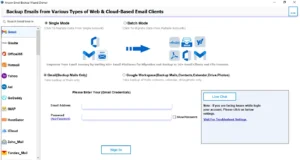
- After that, log in to your Yahoo Mail account.
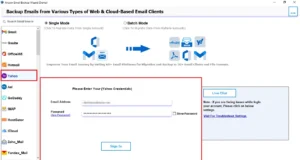
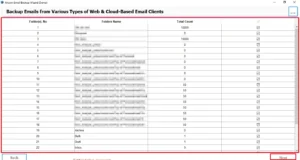
- Then, select and preview the emails or folders you want to export >> Next.
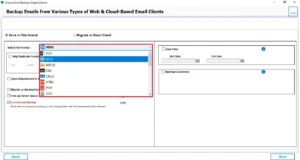
- From the file format, choose MSG as the output format.
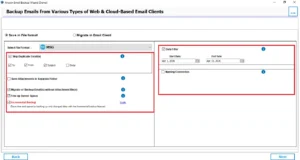
- Thereafter, you need to apply filters if needed for selective migration >> Next.
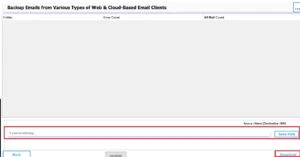
- At last, click on the path to save and click on the Download button.
Key Features of Yahoo Backup Tool
Here are some reasons to export emails from Yahoo Mail to MSG:
- This software exports Yahoo emails to MSG in bulk with batch mode.
- It makes sure to maintain the folder hierarchy and structure.
- In addition, this software uses the date filter option for specific data exportation.
- To minimize the mailbox space and free up server space.
- Eliminate repetitive emails with the help of skip duplicate emails.
- Its user-friendly interface makes the export process easier for all users.
Read More: If you are looking to save your emails in another format, you can also check this guide: Save Yahoo Emails to PDF.
Tips for a Smooth Conversion to Convert Yahoo Mail to MSG
- Firstly, make sure you have a stable internet connection.
- Verify the login credentials before you begin the export process.
- Moreover, you need to choose the correct output location.
- Users need to avoid any kind of interruption during the conversion process.
Conclusion
To wrap up, we discussed all the important reasons why users export Yahoo Mail to MSG. Mainly, users export to get better email management and offline accessibility. While the manual method is suitable for a small number of emails. It is recommended to use professional Software for faster processing and reliability.
Frequently Asked Questions
Ans. Yes, the Yahoo Backup Tool is designed with a simple interface, allowing even non-technical users to export emails easily without any complications.
Ans. The time depends on the size of your mailbox and the number of emails. A small mailbox may take a few minutes, while larger data can take longer.
Ans. To fix errors, make sure your internet connection is stable, your credentials are correct, and the tool is updated. Restarting the process or using a reliable tool can also help resolve issues.
Ans. MSG files are primarily supported by Microsoft Outlook. Some other email clients may not open MSG files directly, so compatibility may vary.
About The Author

Khushboo Maurya is a content and website optimization expert who helps blogs and websites grow naturally. She focuses on improving content quality and reaching more people through smart, simple strategies.