How to Save Yahoo Email as a PDF File With Attachments
Summary: Most of the users save Yahoo email as a PDF file to keep records or access emails offline. Since Yahoo Mail does not offer a direct PDF export option, users often rely on Manual or professional methods. The steps shared in this guide were tested through Yahoo Mail on desktop to check email attachments and export accuracy before explaining the process. We will explore various methods, which include EmailBackupHelp Yahoo Backup Tool, to export Yahoo Mail to PDF format.
Key Factors to Export Yahoo Emails to PDF
- PDFs can be opened on any device without any format structure issues.
- The images and layout stay intact no matter where the file is viewed.
- It can be a password-protected format to safeguard information.
- Also, PDFs can include links and audio that allow interactivity.
- Text in PDFs can be searchable, which makes it easier to find information quickly.
After you have clarified the reasons, move forward and discover how to save Yahoo email to a PDF file with attachments.
Proven Solution to Save Yahoo Email as a PDF
You can follow the given methods for a smooth migration. If you only need to save a few emails, then use the manual Print method. However, for large mailboxes, you can use a professional Yahoo Backup software, which reduces the risk of missing emails.
Manual Method to Convert Yahoo Email to PDF (Print Option)
In this method, we will discuss how users can save Multiple Yahoo Emails as PDF through the print option. Follow the steps to individually save Yahoo email to PDF manually.
- First, go to Yahoo Mail >> log in with your details.
- Now, select and open the email you want to convert to PDF.
- Next, hit on the three dots (more options) in the upper right corner of the email and select Print.
- In the print dialog, select Save as PDF as the printer destination.
- Lastly, click Save, choose the location on your device, and name the file >> Save.
Common Errors While Saving Yahoo in PDF
| Problem | Possible Reason | Solution |
| Print Option Not Working | Browser Issue | Refresh the browser or try another browser |
| Missing Attachments in PDF | Attachments not downloaded | Download attachments separately |
| Incomplete Email Content | Large email thread | Expand the full conversion before saving |
| PDF Formatting Issues | Browser scaling problem | Adjust print layout settings |
Drawbacks of the Manual Methods
- Manually saving Yahoo emails to PDF can take a longer time for multiple emails.
- Important information like timestamps and sender details may not be preserved.
- The method used to copy the content may have an impact on the saved document’s quality.
- For high email volume usage, it is ineffective because bulk conversion is not supported.
Professional Technique to Save Yahoo Email as PDF Easily
The Yahoo Backup Tool helps users to save their Yahoo Mail as a PDF format along with attachments. Also, it can convert any amount of data from Yahoo Mail to PDF all at once. You can save attachment files separately while downloading the emails in PDF format. Moreover, it has an easy-to-use interface for users to save their emails in a simple way. The user can also migrate Yahoo Mail to HostGator, Microsoft 365, Google Workspace, and other formats.
Process to Download Emails from Yahoo to PDF with Attachments
- Download and open the Yahoo Backup Tool on your device.
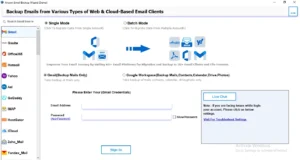
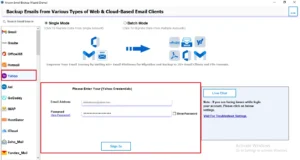
- Choose Yahoo Mail from the list and sign in with your username and password.
- After it processes, choose the folders you want to export >> click Next.
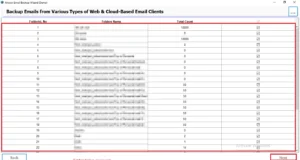
- Then, select PDF as the format from the drop-down menu.
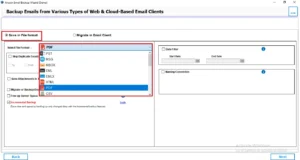
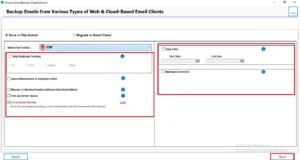
- You can also choose additional features if you want. Click Next again.
- To save files, choose the destination and click the Download button at the end.
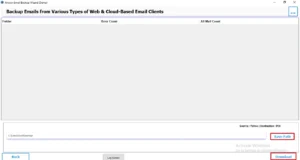
Moreover, you can also export Yahoo Mail to PST, EML, HTML, CSV, MBOX, DOCX, JPEG, TEXT, SVG, EPUB, DOTM, BMP, GIF, OTT, ODT, and many more.
Jessica’s Experience
Earlier, I used a manual method, which worked well for a few files to save as a PDF. However, the attachments were not included automatically, and some email conversions changed. For bulk email exportation, the manual method became a slow process. With this software, I saved my emails in minimal time and in one go. It keeps the email structure intact along with attachments.
Conclusion
This article has discussed different ways to save Yahoo email as a PDF with the help of both manual and professional methods. You can use the manual methods if you have a small number of emails in your Yahoo account. However, if you have a large amount of data, it is better to use an automated solution. Now that you know all the options, you can choose the one that works best for you.
Frequently Asked Questions
Ans. You can use the Yahoo Mail Backup Tool to export multiple Yahoo emails into PDF format at once without manually printing every individual email.
Ans. Formatting issues usually occur due to browser settings, copy-paste methods, or unsupported fonts and images during the email-to-PDF conversion process.
Ans. The conversion time depends on mailbox size, internet speed, and the selected method. Small emails convert quickly, while bulk exports may take longer.
Ans. Yahoo Mail is mainly designed for email communication and management, so it does not provide a built-in feature for directly exporting emails as PDF files.
About The Author

Khushboo Maurya is a content and website optimization expert who helps blogs and websites grow naturally. She focuses on improving content quality and reaching more people through smart, simple strategies.