How to Transfer Yahoo Mail to iCloud Mail in Simple Steps
If you’ve been using a Yahoo Mail account for years, you’re not alone. But if you want to switch to an Apple device, then exporting your Yahoo Mail to iCloud is required. It offers better sync and less clutter across platforms to transfer Yahoo Mail to iCloud. In this article, we will explore the methods to accomplish the import, which include the professional Yahoo Backup Tool for secure migration.
TL;DR: When move Yahoo Mail to iCloud improves privacy and overall email organization. Enterprise users can transfer emails manually, via webmail export/import, or by using a professional tool for faster results.
Quick Comparison: Yahoo Mail vs iCloud
| Features | Yahoo Mail | iCloud |
| Storage | 1 TB | 5 GB (Free) |
| Integration | Limited | Apple |
| Security | Good | Advanced |
| Ads | Yes | No |
Why Transfer Emails from Yahoo Mail to iCloud?
- iCloud works well with Apple products like iPhone, iPad, and Mac.
- It follows the centralized email management, which keeps all the emails in one place.
- Moreover, Apple’s ecosystem offers strong privacy control to its users.
- Furthermore, it syncs emails across all Apple devices instantly.
Best Methods to Transfer Yahoo Mail to iCloud
Now, we will walk through the approaches to transferring your Yahoo Mail to iCloud. Follow the steps to migrate your Yahoo Mail.
- Manual Method
- Professional Software
Pre-Requisites Before Migration
- Make sure to enable IMAP access in the Yahoo Mail settings.
- Always generate an App Password for Yahoo Mail if 2FA is enabled.
- Also, your iCloud storage has enough space.
- Moreover, your internet connection must be stable.
Method 01: Migrate Yahoo Mail to iCloud Mail Manually
In this method, you need to configure both your Yahoo Mail and iCloud accounts in Outlook to transfer your emails. After that, you can move your emails from one place to another. So, this method is suitable for users who have limited data in their Yahoo Mail.
Simple Steps to Move Yahoo Mail to iCloud
- First, Open Outlook and go to File, then choose Add Account.
- After that, type your Yahoo Mail ID and click on Connect to continue.
- Then, enter your Yahoo password to complete the account setup.
- After that, add your iCloud account by following the same process.
- Once both accounts are configured, restart Outlook so everything syncs properly.
- In the end, drag and drop the emails to move them between the accounts.
Disadvantages of the Manual Method
- It takes a lot of time to finish the migration process.
- This method might not be suitable for the bulk migration of emails.
- Configuring email in Outlook can be difficult for some users.
After Migration: Folder Structure When Users Transfer Yahoo Mail to iCloud
One thing that catches many users off guard is how folder structures translate between the two platforms.
| Yahoo Mail Folder | What It Becomes in iCloud |
| Inbox | Inbox |
| Sent | Sent |
| Drafts | Drafts |
| Spam/Bulk | Junk |
| Trash | Deleted Messages |
| Custom Folders | Manually recreated folders |
Custom folders from Yahoo do not always migrate automatically. Then, you may need to manually create matching folders in iCloud before you start the transfer, so emails land in the right place.
Method 02: Move Yahoo Mail to iCloud via Webmail
This approach can be used when you prefer not to rely on Apple Mail or any third-party migration tool.
Step 01: Export from Yahoo Mail
- First, you must open Yahoo Mail in your browser.
- Then, navigate to Settings and then Mailboxes.
- After that, you need to look for export or download options (Yahoo allows you to request a data archive).
- Now, you can Download the archive file (usually in .mbox or .zip format).
Step 02: Import into Apple Mail
- Thereafter, open Apple Mail, and then go to the File tab >> Import Mailboxes.
- Next, select the appropriate format and locate the downloaded Yahoo archive.
- Afterward, click on Continue and let Mail import the emails.
- Once imported, they appear under a temporary folder in Apple Mail.
- At last, drag them from that folder into your iCloud folder.
Remember, this is a slower process and requires several steps, but it works without any need for simultaneous account access.
Method 03: Professional Software for Yahoo Mail to iCloud Migration Tool
Yahoo Backup Tool is the best solution that directly imports your Yahoo Mail to iCloud. Its simple user interface lets users import or export their data to iCloud in a simplified way. Also, it migrate from Yahoo Mail to Zoho ,Gmail, and other email clients.
Steps to Transfer Yahoo Mail to iCloud
- To initiate, download the Yahoo Backup Tool on your PC.
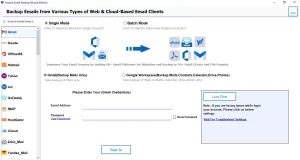
- After that, enter the Yahoo Mail credentials to move further in the process.
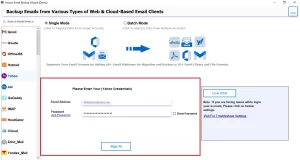
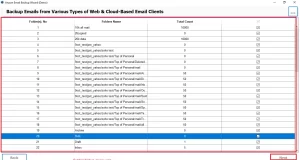
- Now, preview the mailbox folders of your Yahoo Mail >> Next.
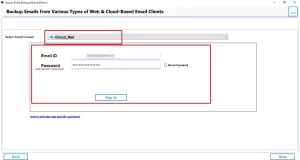
- Next, from the email client, select iCloud and enter the login credentials for the same.
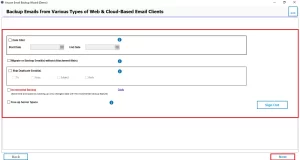
- Then, enable the filters for selective data migration, and then click on Next.
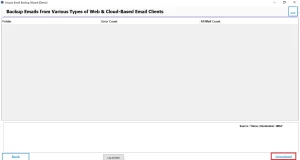
- To finish, click on the Download button to begin the migration process.
Tips for Smooth Yahoo to iCloud Email Migration
- Do not delete Yahoo emails immediately. Keep your Yahoo account active for at least 30 days after migration to catch any stragglers or forwarded messages.
- Transfer in batches. Instead of moving everything at once, move emails year by year or folder by folder.
- Check storage before starting. iCloud’s free tier offers only 5GB. Large mailboxes may require an upgraded iCloud+ plan.
- Use a wired internet connection if possible, especially for large transfers. Wi-Fi interruptions can corrupt the process.
- Generate an app-specific password for Yahoo if you have two-factor authentication enabled — this is required for IMAP access.
Conclusion
Migrating from Yahoo to iCloud is one of those tasks that sounds more intimidating than it actually is. The three methods covered here to transfer Yahoo Mail to iCloud – it really just comes down to whichever feels most natural to you. Work through your emails in batches, take a moment to confirm everything transferred cleanly, and hold off on deleting your Yahoo account until you’re completely sure. As a result, most people finish the whole process in a single sitting and wonder why they put it off as long as they did.
Frequently Asked Questions
Ans. Yes, with the help of professional software, you can directly transfer your Yahoo Mail to iCloud.
Ans. Emails are missing when you use the manual method. It happens due to a sync problem, wrong settings, or an interrupted process.
Ans. The time depends on the mailbox size when transferring Yahoo Mail. For a faster process, you have to choose a professional Yahoo Backup Tool.
Ans. No, there is no need for Apple Mail when you use professional software. It directly imports the Yahoo Mail to the iCloud.
Ans. No, both services work separately and do not sync by default. You need to connect the emails manually between them.
About The Author

Khushboo Maurya is a content and website optimization expert who helps blogs and websites grow naturally. She focuses on improving content quality and reaching more people through smart, simple strategies.