How to Convert OST to PST in Bulk Without Data Loss?
User query: “I have a few OST files from my old Outlook account. But I can no longer access my account, and therefore also cannot access the OST files there. But I need the data in those files. Therefore, I want to convert OST to PST without any data loss or corruption.”
Overview: OST files allow the user to access the Outlook data even when the user is offline. But once they disconnect from the offline Outlook account or Exchange server, they become unavailable. Therefore, when an individual converts an OST file to a PST file, they can easily restore, back up, or transfer their mailbox. The purpose of this article is to introduce users to the Aryson OST to PST Converter Tool, to make them efficiently perform the OST to PST conversion, even if they have a large number of files to convert.
Easy Steps to Convert OST to PST Files
- Launch the Aryson OST to PST Converter Tool.
- Open your OST files to export & hit Next.
- Now, select & preview the files to export and click Next.
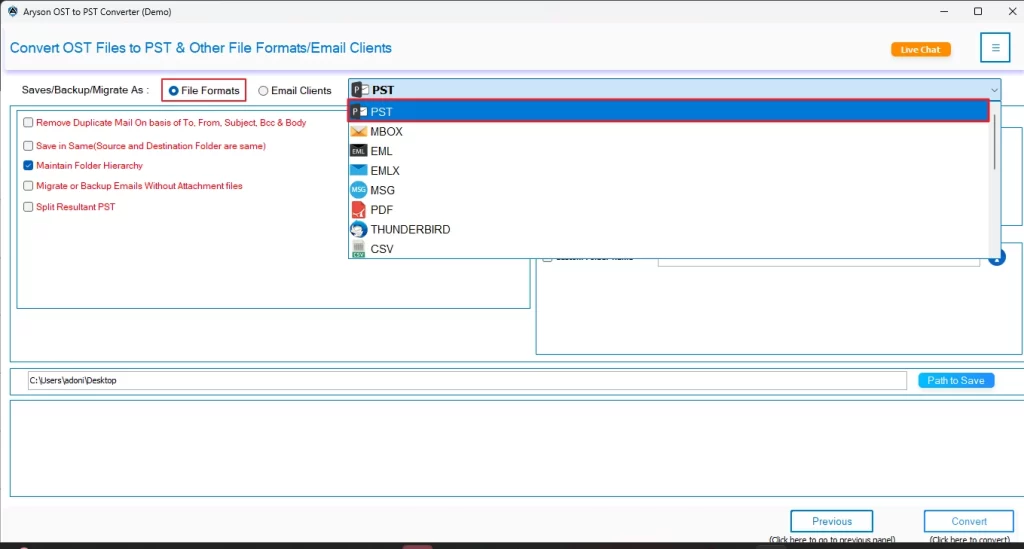
- Select PST from the list of exporting formats.
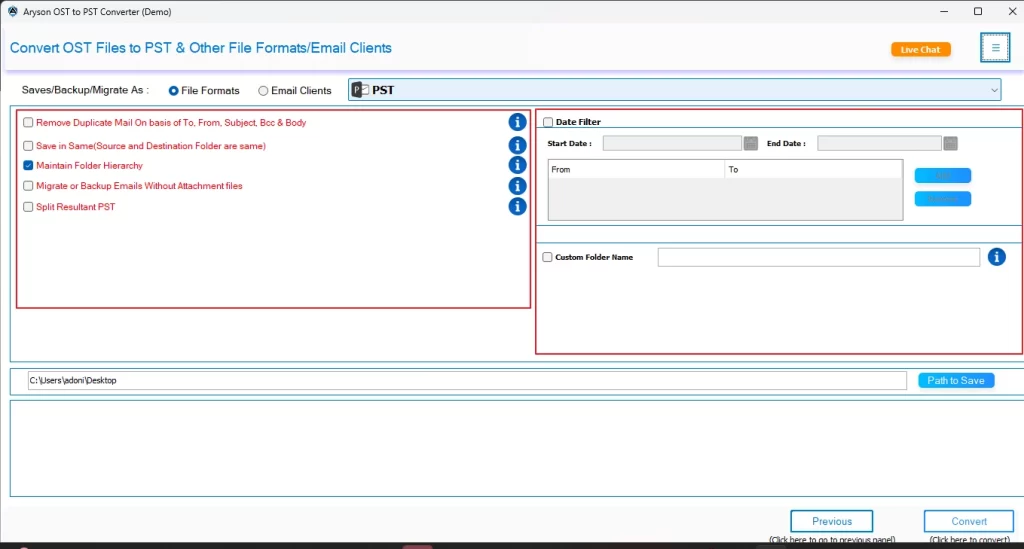
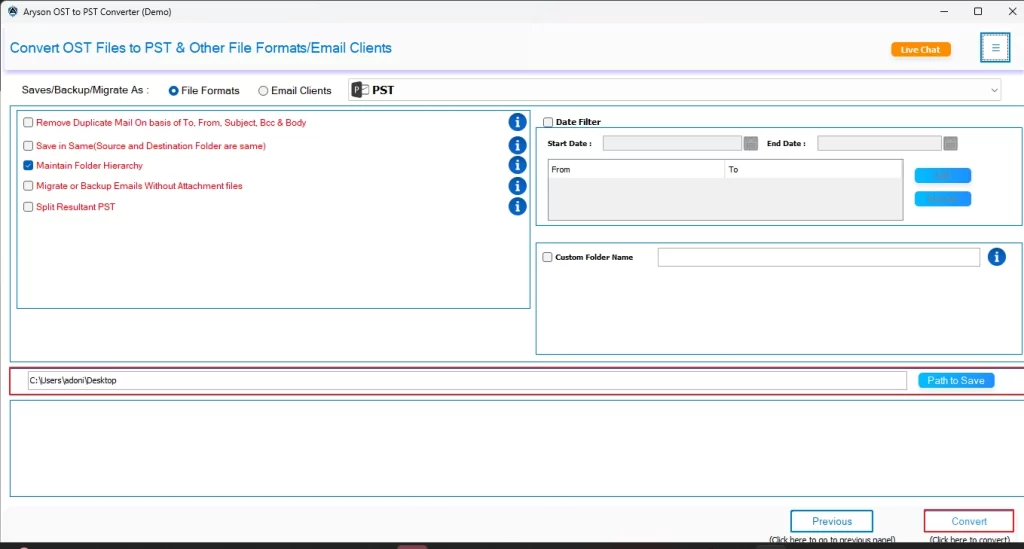
- Apply any filters needed and click Convert to begin conversion.
Within a few seconds, your OST files will be safely converted to PST format.
Understanding the Need to Convert OST File to PST
There are several valid reasons why users want to convert OST to PST files:
- The users can access the OST data even during a corruption of the Exchange Server.
- Conversion to PST format creates a backup copy of mailbox data for safekeeping.
- After conversion, the user can easily move Outlook emails to other accounts or systems.
- It becomes easier to fix damaged or disconnected OST files without needing the original Outlook profile.
- PST files remain safe during server crashes, reinstallations, or accidental deletions.
Reliable Solution Convert OST to PST Without Data Loss
If the user wants to convert multiple OST files to PST quickly, they can use the Aryson OST to PST Converter Tool for the same. This software allows converting OST files to PST in bulk without affecting the folder structure and email metadata. Moreover, it doesn’t even affect the data integrity and offers additional features to the user. Those extra features include removing duplicate emails, skipping previous migration, custom folder names, and date filters. Because of its intuitive interface, many individuals and businesses use this software. Even beginners can easily perform conversion and migration using this software.
Simple Steps to Export OST to PST Using the Software
- Launch the Aryson OST to PST Converter Tool on your existing PC.
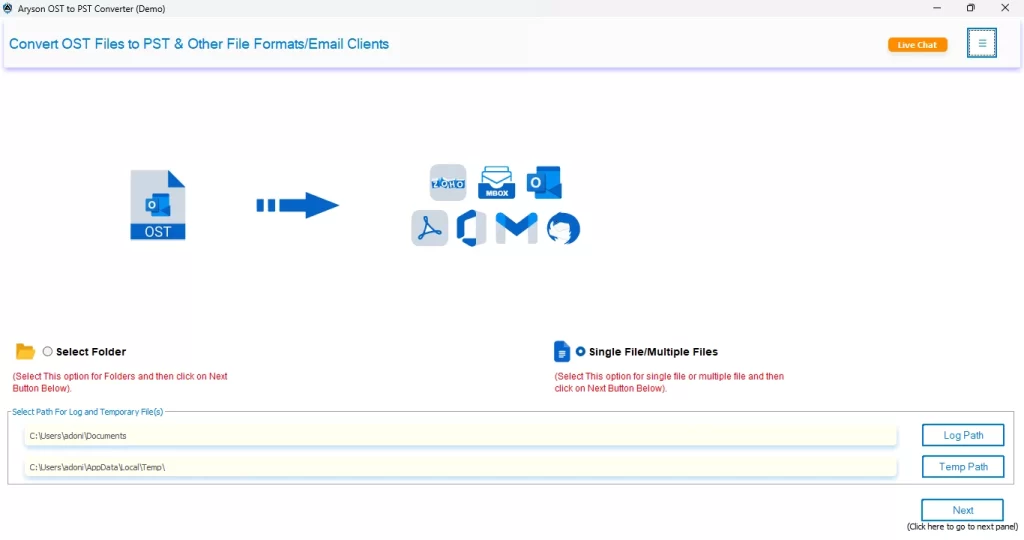
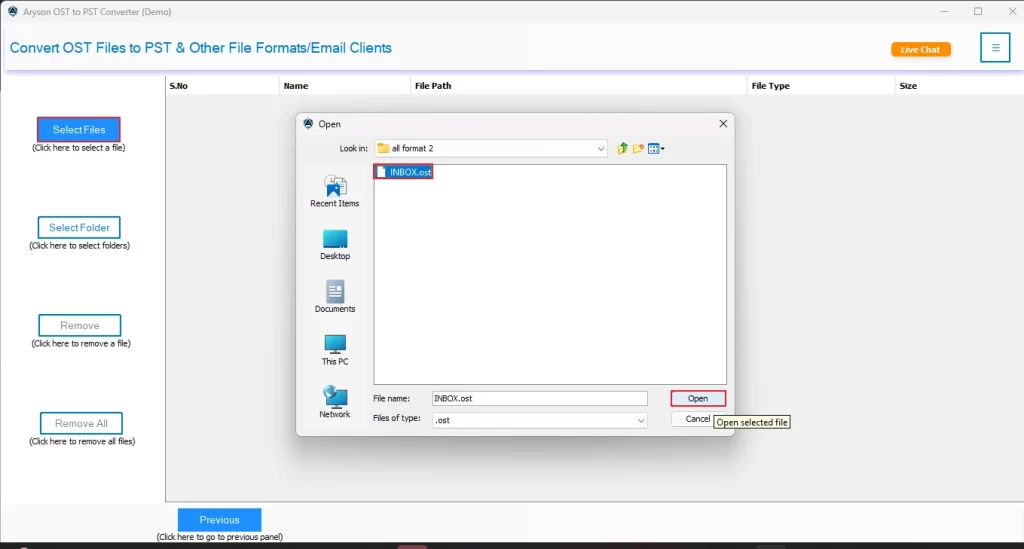
- Then, click on Select Files/Select Folders to open the desired OST files to export & hit Next.
- After that, a tree-like structure will appear on the screen. From which the user can select & preview the files to export and click Next.
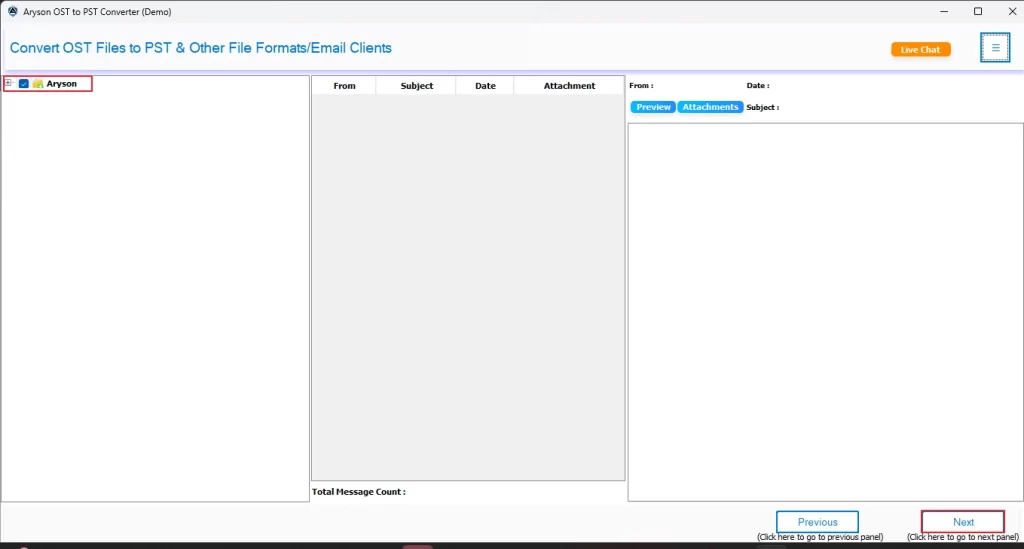
- Next, the user has to select PST from the listed exporting formats.
- Now, as per your requirements, utilize the additional features provided by the software.
- Finally, provide the path to save & click on the Convert button to begin the conversion process.
Enhanced Features of the Software
- Converts multiple OST files to PST files in bulk quickly.
- Users can convert OST to MBOX, EML, MSG, PDF, and many more formats.
- This utility offers advanced features like Remove Duplicates and Date Range Filters.
- Moreover, it keeps all attachments and data of emails intact.
- Along with that, the user can preview the mailbox items before converting them.
- The free demo version allows for the free conversion of up to 50 emails from a folder.
Conclusion
In this article, we discussed how OST to PST conversion is essential for the user in terms of backup, accessibility, and migration. Along with that, we explored an automated software to batch convert OST to PST, without losing any data. With the help of this software, users can easily perform conversions within a few seconds. Even if you are an advanced user or a beginner, in both cases, this software will help you with its advanced features.
Frequently Asked Questions
Ans- No, OST files cannot be opened directly without Outlook. You must convert them into PST or another accessible format to view their contents.
Ans– Typical issues include file corruption, incomplete conversion, or large file size errors. Using a professional tool ensures a smooth and complete process.
Ans– Yes, the Aryson OST to PST Converter Tool supports batch conversion, letting you convert OST files to PST in bulk.
Ans– Yes, the software can recover and restore deleted or inaccessible emails while converting them to PST.
Ans– Absolutely. The tool works in a fully offline and secure environment, ensuring no virus or malware risk.
Ans– Conversion time depends on the file size and system speed, but the tool processes even large OST files in just a few minutes.
About The Author

Khushboo Maurya is a content and website optimization expert who helps blogs and websites grow naturally. She focuses on improving content quality and reaching more people through smart, simple strategies.