
How To Export Hotmail Emails To PST in 2026
Hotmail and PST servers are used for different roles in order to handle your email and storage. Hotmail is a web-based email platform that stores your emails on a cloud server and allows access from any device. Whereas PST is a file format that is used by Microsoft Outlook in order to store mailbox data locally on a system. Due to this difference, most of the users need to export their Hotmail emails to PST for better control over their data. In this blog, we will cover the most effective methods to export Hotmail emails to PST, which include the Email Backup Wizard for accurate data transfer.
TL;DR: Organisations export their Hotmail emails to PST for offline access, backup, and better data control within Outlook. This can be done using Outlook’s built-in export feature for basic needs or via Email Backup Wizard or a faster, more accurate, and large-scale export process.
Reasons to Export Hotmail to PST
The process to export your Hotmail emails to PST provides better control over email data and supports efficient management within the Outlook environment.
- Users can access their emails without the help of an internet connection.
- You can easily create a local backup for your long-term data safety.
- Moreover, it becomes easy to transfer your data to Microsoft Outlook.
- PST helps to minimize dependency on web-based email platforms.
- Likewise, it is useful to maintain records for compliance purposes.
Proven Approaches to Export Hotmail Emails to PST
There are multiple ways to complete the process, and the suitable methods depend on your data size.
- Built-in Method
- Automated Method
Approach 01: Built-in Method to Export Hotmail Emails to Outlook PST
This approach uses Microsoft Outlook to connect your Hotmail account and then export the mailbox data into a PST file. Moreover, it works for basic requirements when the account is properly configured and synced.
Step 01: Add and Sync Hotmail Account in Outlook
- Start the procedure by opening Microsoft Outlook on your system.
- After that, go to File >> Add Account and enter your Hotmail login details.
- Now, you have to complete the setup via IMAP configuration.
- Then, you have to allow Outlook to sync all emails with the server.
Step 02: Export Mailbox to PST File
- Thereafter, you need to go to File >> Open & Export >> Import/Export.
- Afterwards, you have to select Export to a file and click Next.
- Now, you need to choose the Outlook Data File (.pst) and proceed.
Step 03: Select Data and Complete Export
- You need to select the Hotmail mailbox or the required folders.
- After that, you have to choose a location to save the PST file.
- Now, you have to click on Finish to export Emails from Hotmail to PST.
- At the end, you need to verify the saved PST file after completion.
Drawbacks of the Manual Method
- Users require a proper Outlook configuration with a valid Hotmail account.
- Moreover, the process of sync can take a long time for large mailboxes.
- It depends on a stable internet connection during email downloads.
- There is a risk of incomplete data export if sync is interrupted.
- Likewise, this approach may not maintain full data accuracy in some cases.
Approach 02: Automated Method to Export Hotmail Emails to PST
Email Backup Wizard is the easiest and most reliable way to export your Hotmail emails directly to PST format without having any lengthy setup. Moreover, it helps in bulk data export and keeps the email elements, such as attachments and metadata, intact. Likewise, it provides options such as selective backup and many more, which make it a practical choice for both personal and business use. You can also check our step-by-step guide on how to transfer Hotmail emails to Gmail for an easy and secure transfer process.
Steps to Backup Hotmail Emails to PST:
- Firstly, you need to install and open the Email Backup Wizard.
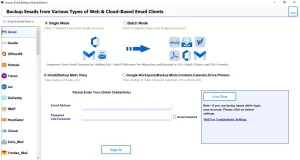
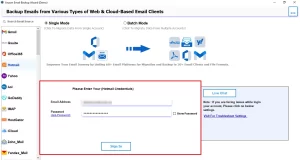
- After that, you need to sign in using your Hotmail account credentials.
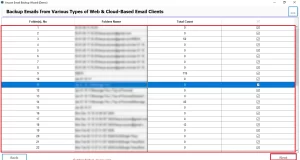
- Thereafter, you have to select the required mailbox folders for export.
- Now, choose PST as the output format >> apply filters if required.
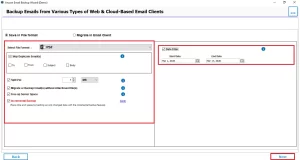
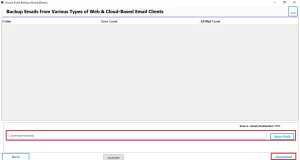
- At the end, set the destination path >> Download to begin the process.
End Note
In this blog, we have covered the effective ways to export Hotmail emails to PST. The manual approach works for your few data but depends on proper synchronisation. On the other hand, the automated tool offers a more reliable way to handle your large volume of data and maintains the email structure and accuracy. Select the appropriate approach so that you can complete the export process smoothly. Likewise you can keep your Hotmail data accessible in Outlook for better management.
Frequently Asked Questions
Ans. No, exporting emails using the Email Backup Tool does not remove data from your Hotmail account. It only creates a copy in PST format.
Ans. It allows offline access, creates a secure backup, and helps manage emails easily in Microsoft Outlook.
Ans. The time depends on mailbox size and internet speed, but the tool completes the process faster with bulk export support.
Ans. Yes, PST files can be accessed in Outlook without an internet connection once the export is complete.
Ans. If a PST file gets corrupted, it may become inaccessible. However, using a reliable tool reduces the chances of file corruption during export.
Ans. Yes, the Email Backup Tool supports exporting Hotmail emails to PST on both Windows and Mac platforms.
About The Author

Khushboo Maurya is a content and website optimization expert who helps blogs and websites grow naturally. She focuses on improving content quality and reaching more people through smart, simple strategies.