How to Quickly Migrate Office 365 to Zoho Mail Like a Pro?
User query: “Yesterday, I needed to migrate Office 365 to Zoho Mail but didn’t know a reliable way to do the same. Can anyone tell me a secure and quick way to perform the migration?”
Overview: Do you also feel stuck when trying to migrate Office 365 to Zoho Mail without losing important data? If yes, you’re not alone. I was in the same situation a few days ago and realized how confusing it can be without the right steps. That’s exactly why I created this guide for you. Here, you’ll find the most effective way to get the job done. Here, we will share a quicker and more secure approach, and then I’ll share a faster and safer approach using the Aryson Email Backup Wizard. Both options are explained step-by-step so you can choose the one that works best for you.
Why Should You Migrate Office 365 to Zoho Mail?
When you compare Office 365 and Zoho Mail side by side, you can clearly see the difference between the two. Here’s how Zoho Mail stands out:
| Reasons | Office 365 | Zoho Mail |
| Collaboration | Microsoft apps integration | Zoho apps integration |
| Privacy | Some data tracking | Strict no-ad policy |
| Pricing | Expensive plans | Affordable options |
| Interface | Heavy, feature-packed | Clean and ad-free |
| Migration | Needs technical support | Easy built-in tools |
From the above table, you can clearly see the advantages offered by Zoho Mail; therefore, you must move from Office 365 to Zoho Mail. To perform the migration, you can use the automated solution provided below.
Automated Solution to Migrate Office 365 to Zoho Mail
Aryson Email Backup Wizard is one of the most trusted software available to migrate Office 365 emails to Zoho Mail without losing attachments. This software keeps your data secure and offers you some useful features, such as:
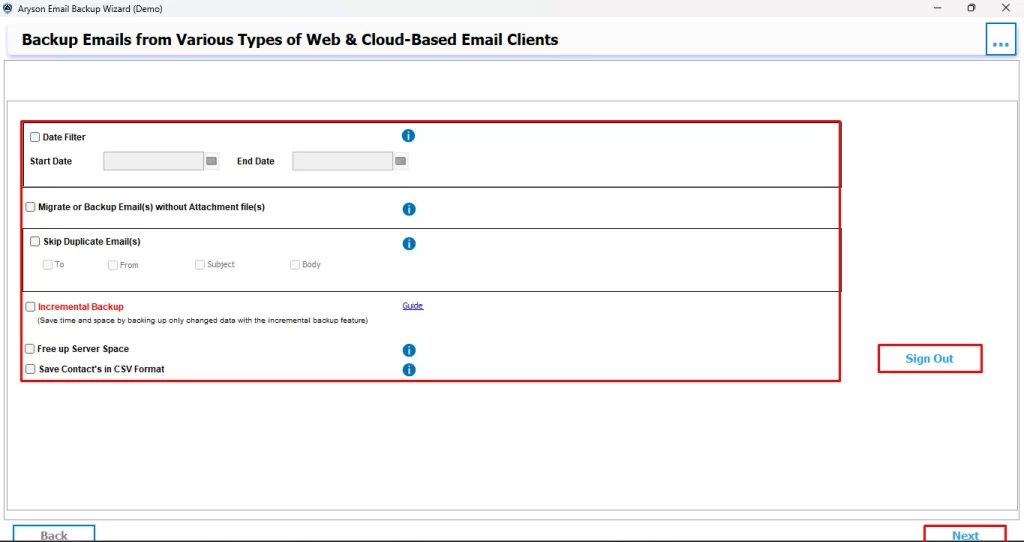
- Skip Previous Migration – avoids duplicate exports.
- Free Up Server Space – clears emails once they are backed up.
- Date Filter – lets you choose only the emails you really need.
Moreover, it can convert Office 365 emails into formats like PDF, MSG, and many more, giving you complete control over your data. Also, you can migrate Office 365 to IMAP server, G Suite, Gmail, etc. To perform the migration, avoiding errors, you can follow the steps below carefully.
Quick guide to migrate Office 365 to Zoho Mail
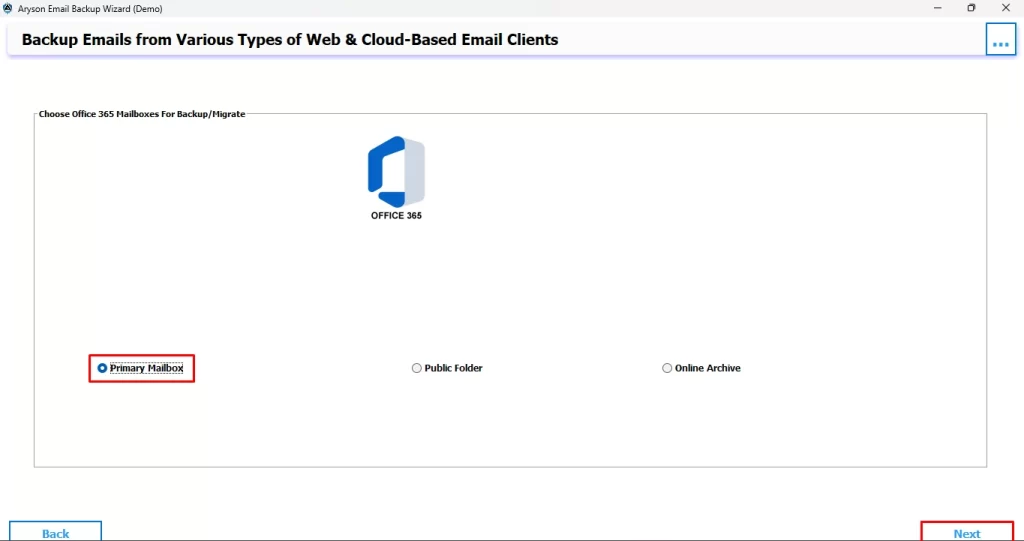
- Open the Aryson Email Backup Wizard and sign in with your Office 365 account.
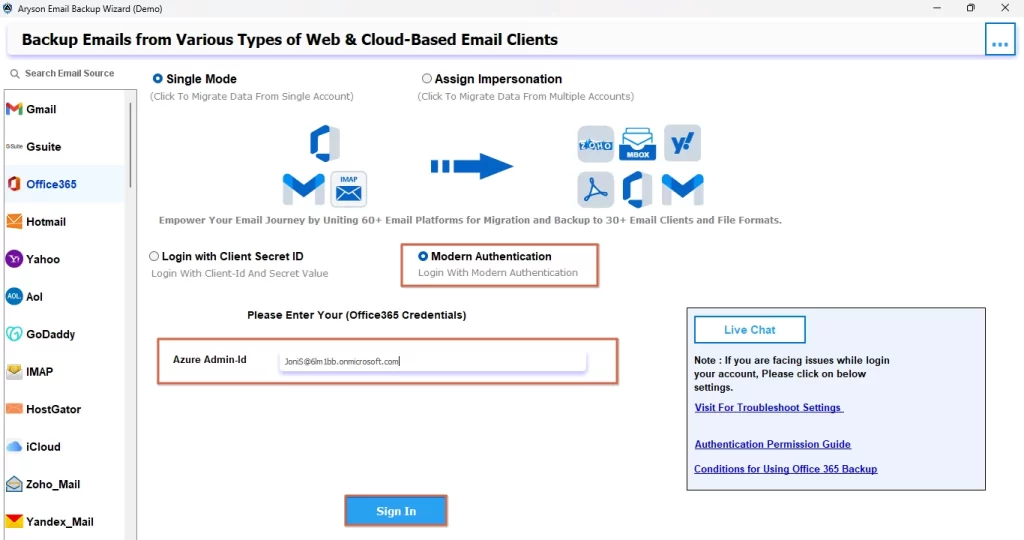
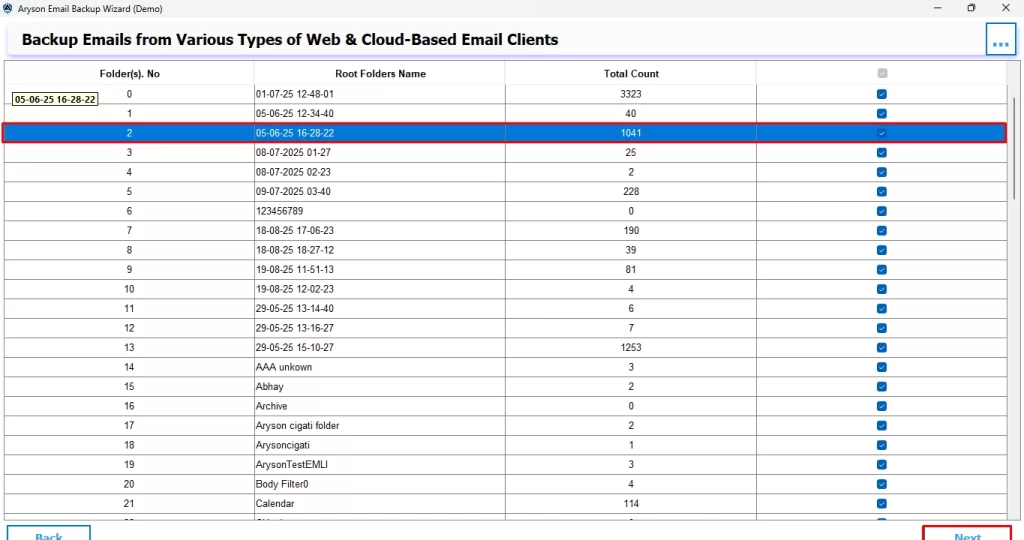
- Then, select the mailbox folders you wish to move and click Next.
- After that, preview the chosen emails and confirm to proceed further.
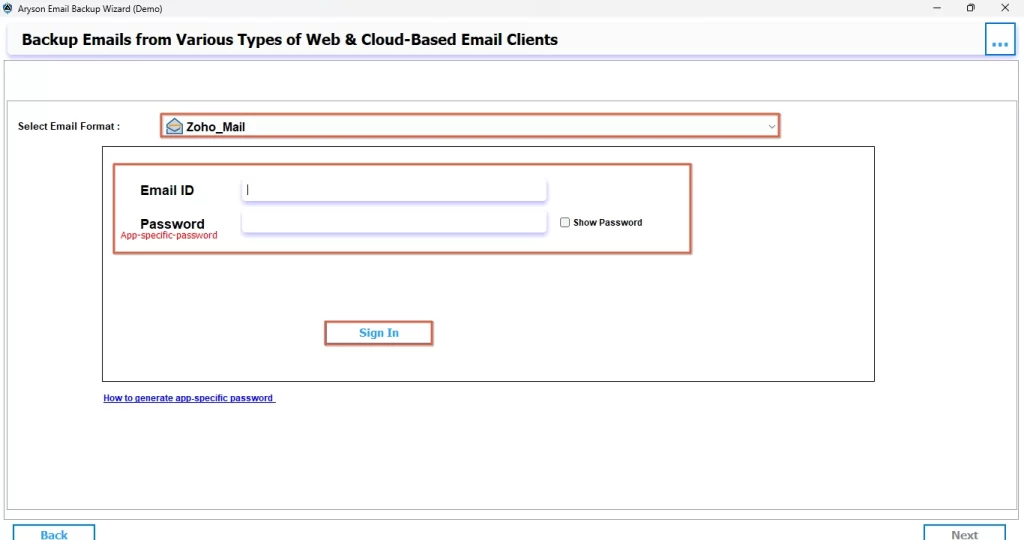
- Now, choose Zoho Mail as the output email client and sign in.
- Use the extra filters & click Next to transfer emails from Office 365 to Zoho Mail.
If you have followed these steps carefully, you can easily migrate Office 365 to Zoho Mail without encountering any errors or losing any data or attachments during the migration.
Additional Benefits of Aryson Email Backup Wizard
There are several benefits offered by the Aryson Email Backup Wizard. A few of them are listed below:
- You can easily back up emails locally from any web or cloud-based client.
- This software can migrate emails across platforms with zero downtime.
- Moreover, you can save emails in multiple formats like PST, PDF, EML, MBOX, CSV, and more.
- This software can perform batch backup and direct migration to Office 365, Gmail, G Suite, or IMAP.
- You can skip duplicates and free up server space for new emails.
- Additionally, it offers you an easy-to-use, beginner-friendly interface with Windows & Mac support.
Conclusion
The above blog discussed an automated solution to migrate Office 365 to Zoho Mail. Along with the software explanation, you were also provided with the steps to perform migration using it. Moreover, this software allows you to migrate your emails without any data loss or corruption. Also, if you have a large number of emails available to migrate, you can proceed with this method. In the FAQs section below, we have various questions commonly asked by different users.
Frequently Asked Questions
Ans- Yes, you can. During the Office 365 to Zoho Mail migration process, filters allow you to choose specific folders, date ranges, or particular items so that only the required emails are transferred instead of the entire mailbox.
Ans- Yes, there can be a few. Limitations usually depend on factors like mailbox size, internet speed, server restrictions, or the method you are using. Manual migration methods may be time-consuming and less flexible, while using the Aryson Email Backup Wizard will help you minimize such challenges.
About The Author

Khushboo Maurya is a content and website optimization expert who helps blogs and websites grow naturally. She focuses on improving content quality and reaching more people through smart, simple strategies.