How to Convert OST Files to PDF with Attachments
Nowadays, OST files in Microsoft Outlook store important mailbox data, such as emails and attachments. Most of the users convert their OST files to PDF format for better accessibility across different devices. Also, PDF files help users to maintain the original formatting and structure of email content. In this guide, you will learn simple step-by-step methods to convert OST files to PDF efficiently, which include an OST to PDF Converter Tool for easy conversion.
Use Cases to Convert OST to PDF
- It saves important Outlook emails in a universally accessible PDF format.
- PDF share email conversations securely with clients, teams, or legal departments.
- Moreover, it creates a printable copy of your emails for documentation purposes.
- Additionally, it archives mailbox data for long-term storage & future reference.
- You can access email content on different devices without Outlook installation.
- Furthermore, it preserves email and attachments in a structured format.
Things to Remember before You Start the Conversion
- Make sure to always take a backup of your OST files.
- Also, analyze whether Microsoft 365 is properly installed or not in your system.
- Moreover, you need to verify that your OST files are not corrupted or inaccessible.
- Not only that, you have to make sure about the enough storage on your device.
Proven Methods to Convert OST Files to PDF
We will discuss the appropriate solutions to accomplish the conversion process with accurate results.
- Microsoft Outlook (Print Option)
- Microsoft Word
- Professional Software
Manual Approaches to Convert OST Emails to PDF
Using Outlook, you can convert files in two ways. These methods work for single files, and be careful while performing these steps. Below are the two approaches as follows:
1st Approach: Export OST File to PDF Using the Print Option
- Open Microsoft Outlook on your system.
- Select the OST email that you want to save as a PDF.
- Meanwhile, click on the File tab >> choose the Print option.
- From the Printer drop-down menu, select Microsoft Print to PDF.
- Click the Print button to continue.
- Afterward, choose the destination location to save your PDF file.
- In the end, enter the desired file name and click on the Save button.
2nd Approach: Save Outlook OST Files to PDF Using MS Word
- Launch Microsoft Outlook and open the OST email you want to convert.
- Just click the File tab and select the Save As option.
- After that, you have to choose HTML from the Save as Type drop-down menu.
- Select the destination location and save the HTML file.
- Navigate to the saved HTML file and open it in Microsoft Word.
- In MS Word, click on File >> Save As.
- Choose the destination folder to save the file.
- Finally, select PDF as the output format from the Save as Type menu.
- At last, click the Save button to complete the conversion process.
Drawback of the Manual Approach
- It converts only a single file at a time, hence it is a time-consuming process.
- You have to perform several manual steps to convert the files.
- This method does not have a skip duplicate option.
- It is difficult for non-technical users to follow this approach.
Software-Based Approach to Convert OST Files to PDF
You can opt for the OST to PDF Converter tool. This tool will maintain the folder structure and allow bulk conversion of multiple OST files at once. In this, you find various formats to convert OST to vCard, like PST, EML, PDF, etc., to convert the files. Before exporting, it gives you a preview of your emails and provides filters to convert only the data you need. In addition, this software is made to recover the corrupted or inaccessible files.
|
Note: The Demo Version of the OST to PDF Converter tool allows free conversion of up to 50 emails per folder. For any technical help, you can contact the technical team available 24/7. |
Process to Move OST Files to PDF
- To initiate, download and install the OST to PDF Converter.
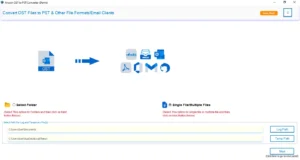
- Select the Folder/Single or Multiple Files, and click Next.
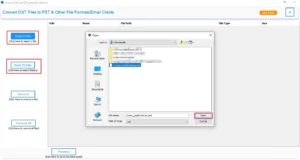
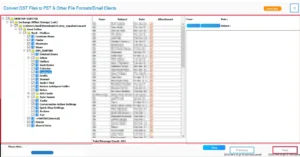
- Preview it, select the items you want to convert, and click Next.
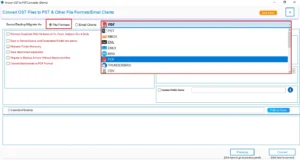
- Then, choose PDF as the output format from the given file formats.
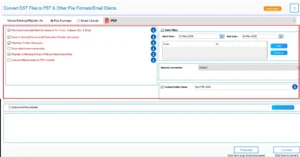
- Apply the specific filters for selective data conversion.
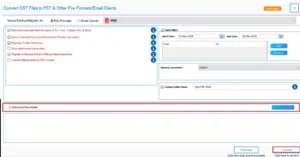
- At last, select the destination to save the file after export and click Convert.
Comparison Between Manual and Software-Based Approach
| Features | Manual Method | Software-Based Approach |
| Bulk Conversion | Suitable for limited email conversion | Supports bulk OST file conversion |
| Folder Hierarchy | Limited folder management | Maintains original folder structure |
| Large OST file support | Suitable for smaller conversions | Efficiently handles large mailbox files |
| Selective Conversion | Limited filtering options | Advanced filters for selective export |
| Output Management | Manual File Organization | Organized Saving and Export Options |
| Preview Option | Not Available | Preview emails before conversion |
Conclusion
To finish it up, we discussed all the scenarios to convert OST files to PDF. With the correct approach, you can perform the conversion process in a smooth and faster way. The manual method is good for small file conversion. Therefore, it is recommended to use a software-based approach to complete the conversion process. This software can perform the conversion at a faster speed and in bulk.
Frequently Asked Questions
Ans: Yes, the conversion process maintains the original email formatting and structure.
Ans: Yes, professional tools support large OST mailbox conversion efficiently.
Ans: Yes, emails can be converted to PDF along with attachments.
Ans: Manual methods require multiple steps and are suitable for limited conversions.
About The Author

Khushboo Maurya is a content and website optimization expert who helps blogs and websites grow naturally. She focuses on improving content quality and reaching more people through smart, simple strategies.