How to Convert AOL Emails to PDF with Attachments?
Overview: AOL Mail is a well-established web-based email service that provides features such as unlimited storage, spam filtering, and access from various devices. But, because of a variety of reasons like data loss and security concerns, many users want to convert AOL emails to PDF for better backup or export options. Saving emails in PDF file format provides an easy way to keep a copy of those emails offline. This write-up will take you through various methods of converting AOL emails to PDFs with attachments, including the Aryson Email Backup Wizard. But before performing the conversion, you need to understand the needs of the conversion first.
Understanding the Need to Convert AOL Emails to PDF
Before the step-by-step process starts, it is crucial to understand at least the motivations for the decision to save AOL emails in PDF files for many users. This ensures you know the relevant practical considerations, rather than knowing only the procedures.
- The PDF file format preserves the original formatting of emails, including fonts, colors, and layout.
- Once you save your emails in PDF format, you can also access them offline.
- PDFs make it easy to share emails and attachments safely, without depending on any specific platform.
- The PDF file first offers a better and more organized backup of important emails.
- Since PDFs are accepted in most legal and official contexts, they’re a reliable choice for archiving emails when required.
How to Convert AOL Emails to PDF?
The user can use two effective methods for the conversion of AOL emails. Both are discussed below. The choice of method completely depends on the requirements and needs of the user.
Solution 1: Manual Method to Convert Emails from AOL to PDF
This method allows AOL Mail users to save their emails as a PDF directly from their inbox. However, this method will work absolutely fine, but this method is only for single emails, not for bulk conversion. Detailed Steps to save AOL email as PDF are as follows:
- Firstly, log in to your AOL Mail account using valid credentials.
- Then, open the particular email that you wish to turn into a PDF.
- After that, click on the More menu option.
- There, in the menu, choose the Print Message option.
- Now, adjust print settings as per your needs.
- To save your email, now press the Save button.
- Pick a storage location, add a file name, and confirm the save.
Drawbacks: This method consumes long hours for bulk conversion. Moreover, it allows saving only one email at a time & requires some technical knowledge from the user.
User query: “I am an AOL Mail user and want to convert all my AOL emails to PDF format. But unfortunately, I don’t know any quick way to do the same. Can anyone tell me a quick as well as reliable way ot do the same?”
Solution 2: Automated Solution to Convert AOL Emails to PDF
For the above user, the manual method will not work well, as the user has a large number of files in their AOL mailbox. In such a case, the user can use the Aryson Email Backup Wizard to export AOL emails to PDF securely and efficiently. This software also keeps all the important attachments and data preserved and intact, without any data loss. Moreover, it offers features like date filtering, skipping previously migrated emails, and managing server space efficiently. Additionally, the user can also export AOL emails to MBOX files, PST files, EML files, and many more.
Simple Steps to Convert AOL Emails to PDF
- Open the Aryson Email Backup Wizard and select AOL from the left panel.
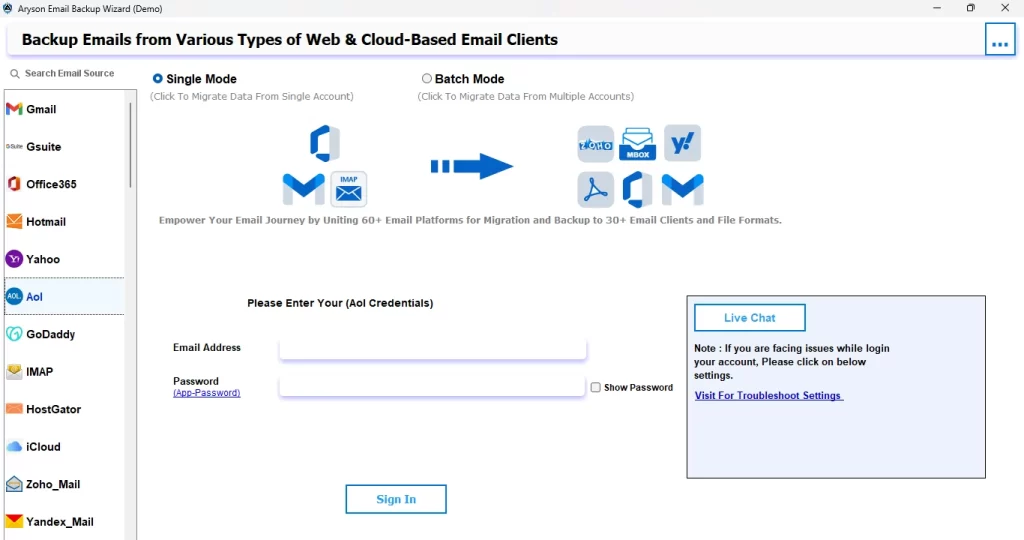
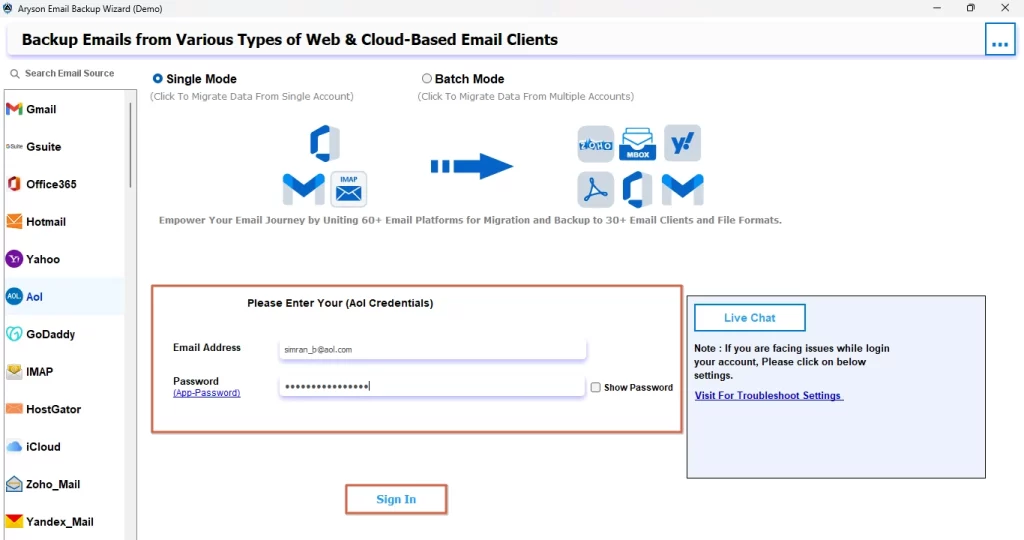
- Enter your AOL credentials and click the Sign In button to proceed.
- All your AOL emails will appear; choose the ones you want to migrate.
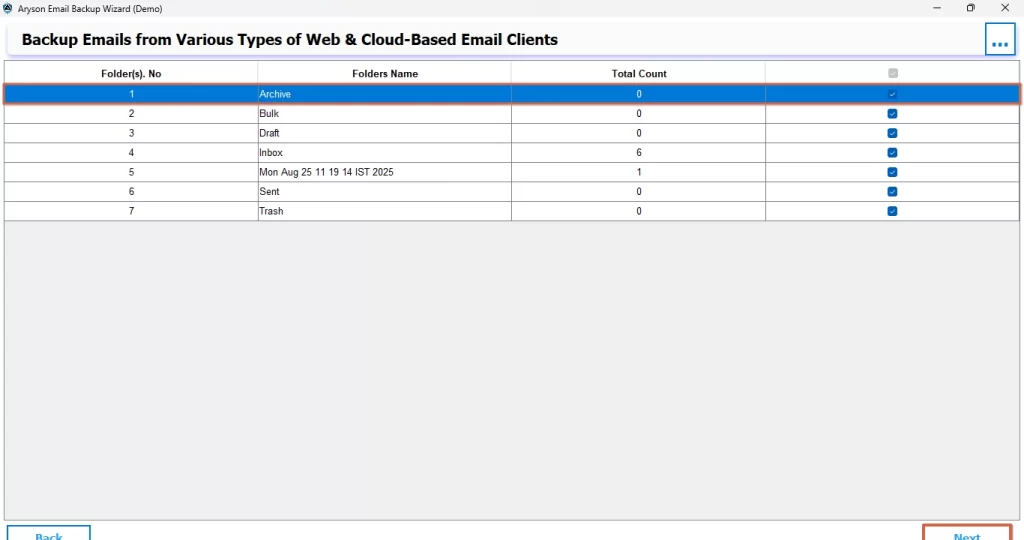
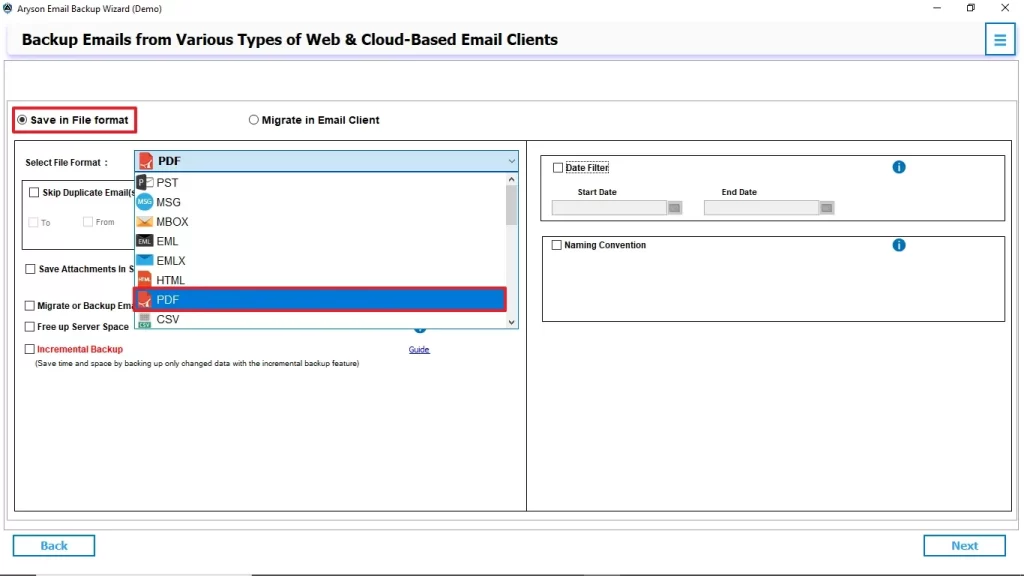
- Select PDF from the list of all file formats.
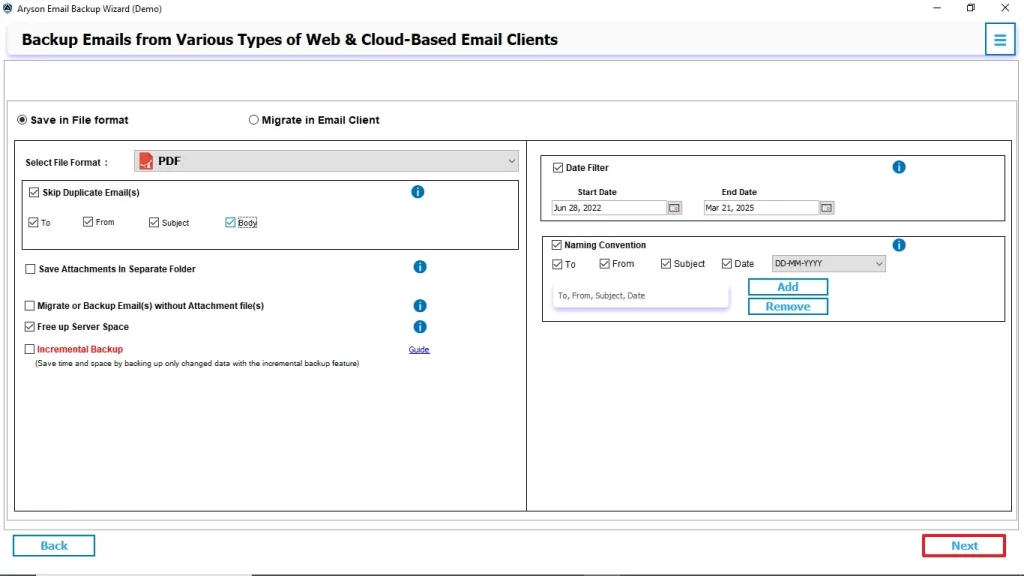
- Use the filters to refine the emails by date, folder, or type.
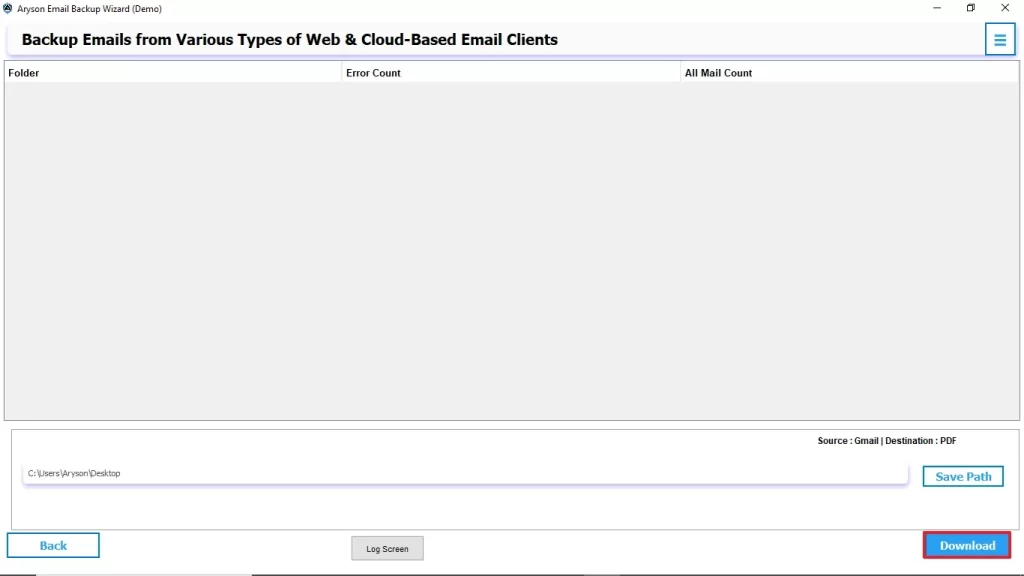
- Pick a destination path and click Start Migration to complete the process.
Let’s Wrap Up
If we summarize the whole blog, the user can convert AOL emails to PDF to keep their emails and attachments secured & preserved. Such that the user can easily access the emails even when they are offline. If the reader has followed the steps of the methods provided above, they can easily and efficiently manage and filter. And they can export emails without any data loss. Which eventually makes the process reliable and straightforward.
Frequently Asked Questions
Ans- Yes, you can easily save your AOL emails to PDF format with the help of the Aryson Email Backup Wizard, without losing your attachments and data.
Ans- Yes, using the Aryson Email Backup Wizard, it is possible to export all emails from AOL Mail to PDF at once. Whereas, if you choose the manual method, it will become a hectic task to convert each file separately.
Ans– Converting AOL emails to PDF file format opens up various benefits for the user, such as easier backup, organization of emails, and offline accessibility. Original formatting, etc.
Ans- It is advantageous to export AOL emails to PDF for secure storage, easy sharing, and universal access. PDFs maintain the original email format, support legal documentation, and allow businesses to archive communications efficiently.
About The Author

Khushboo Maurya is a content and website optimization expert who helps blogs and websites grow naturally. She focuses on improving content quality and reaching more people through smart, simple strategies.